Consistent report structure
Standardize how findings, citations, and exhibits appear so a new reviewer is not learning a new binder every time.
Faster to write. Faster to review. That’s the ROI.
From program audits and inspector-general reviews to regulatory exams and legislative reports, CITE keeps source material, citations, and the narrative in one workspace. A reviewer can jump from a finding to the cited page. A short pilot on a few real reports will show the time save.
Keep statutes, inspections, interviews, and correspondence open while you draft. One-click citations tie each finding to the page behind it, so collation does not become a second project.
Use templates and snippets for audits, IG reviews, exams, and briefings. The editor is familiar to anyone who has used Word, without forcing a new case-management system.
Export a single interactive PDF that carries the narrative and clickable citations. Counsel, an IG shop, a legislature, or a partner agency can open it in an ordinary PDF reader.
Stop rebuilding exhibit binders before a hearing or supervisory review. The citation and the source stay connected from the first draft through handoff.
Hours not spent assembling the file come back as time for fieldwork, interviews, and the finding itself.
We offer a free pilot for organizations and agencies that want to run CITE on their own cases. Three to five source-intensive reports will show what faster writing and faster review are worth for your unit.
CITE is Windows desktop software. Import the documents you already keep on shared drives or in a records system. No API-level integration is required for typical use.
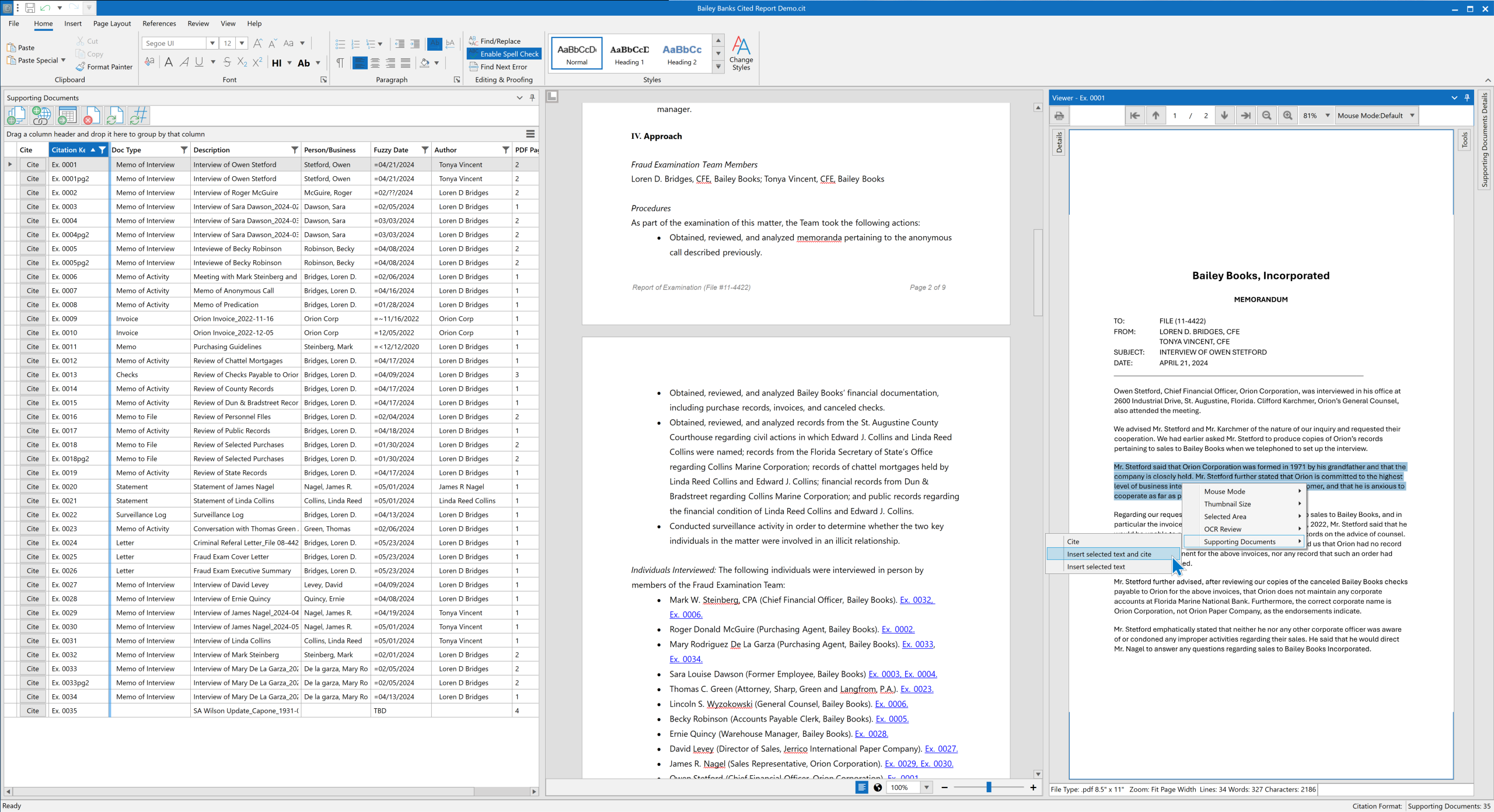
Whether the work is a program audit, an inspector-general review, a regulatory exam, or a report to a legislature, CITE keeps the finding tied to the source.
Standardize how findings, citations, and exhibits appear so a new reviewer is not learning a new binder every time.
Share templates for audits, exams, briefings, and IG memos. Sources stay in the project with the draft.
When a matter moves between analysts, counsel, or a partner agency, the linked PDF carries the narrative and the cited pages.
Interactive PDFs let a supervisor or outside reviewer jump from a citation to the source page.
CITE is Windows desktop software you install locally. Download the free trial, then run CiteSetup.msi. When you first launch CITE, you can set up your license in the app—choose a free trial or a paid plan. You do not have to activate a license before you open CITE.
Create or open a project (.cit file) and import supporting documents. Open those files in the Viewer, then create citations to them in the report editor. When you are ready, export a linked interactive PDF for reviewers.
Want a walkthrough first? Book a demo through the contact form. Enterprise customers can add dedicated onboarding and customized training.
Most users are up and running in under 30 minutes. CITE’s interface is intentionally designed to feel familiar to anyone who’s used Microsoft Word. Enterprise licenses include personalized onboarding sessions, group training, and a dedicated account manager to help configure workflows and templates.
Absolutely. CITE maintains local control of all files and provides an audit log, time-stamped citations, and unique identifiers for every source.
Yes! Create tailored templates and customize citation formats to align with your organization’s investigative protocols and compliance requirements.
Yes. CITE allows for any CITE user to add tracked changes and comments, and exports interactive PDFs that make review faster and clearer. For other stakeholders, CITE creates an interactive linked PDF containing the report and source documents in a single file which can be read by anyone with a PDF reader.
Optionally. CITE does not require AI. If you connect a verified provider (ChatGPT or Gemini—using your account/API arrangement), you can use assisted actions such as summarize, rewrite, or extract key points on text you choose to send. That transmission goes to the provider you selected under that provider’s terms; it does not go to an in8development-hosted model. Do not connect AI, or send source material, unless that provider meets your security obligations. See Security for the shared-responsibility summary.