Skip to content

CITE: Faster Research. Stronger Sources. Smarter Scholarship.

CITE empowers academic researchers, faculty, and students with a single platform to write, cite, and export interactive, source-linked reports. From literature reviews and research papers to grant submissions and classroom assignments, CITE keeps sources, citations, and the draft in one workspace so a reviewer can check a claim without hunting folders.

One App. All Sources. Superior Reports in Record Time.

Faster to write. Faster to review. That’s the ROI.

Whether you’re developing dissertations, publishing research, grading essays, or submitting grant proposals, CITE centralizes research, references, and supporting documents into a single interface—accelerating research workflows across disciplines. Sources, citations, and the draft stay in one workspace so a reviewer can check a claim without hunting folders. A short pilot on a few real reports will show the time save.

Say goodbye to juggling word processors, citation managers, PDFs, and external file folders. With CITE, all source materials and citations live within the same workspace—making research writing seamless, efficient, and academically sound.

CITE isn’t merely a citation tool—it’s a comprehensive report creation platform tailored for education and scholarly publishing. Use customizable templates for papers, lesson plans, grant proposals, or teaching materials, complete with familiar editing tools and one-click source attribution.

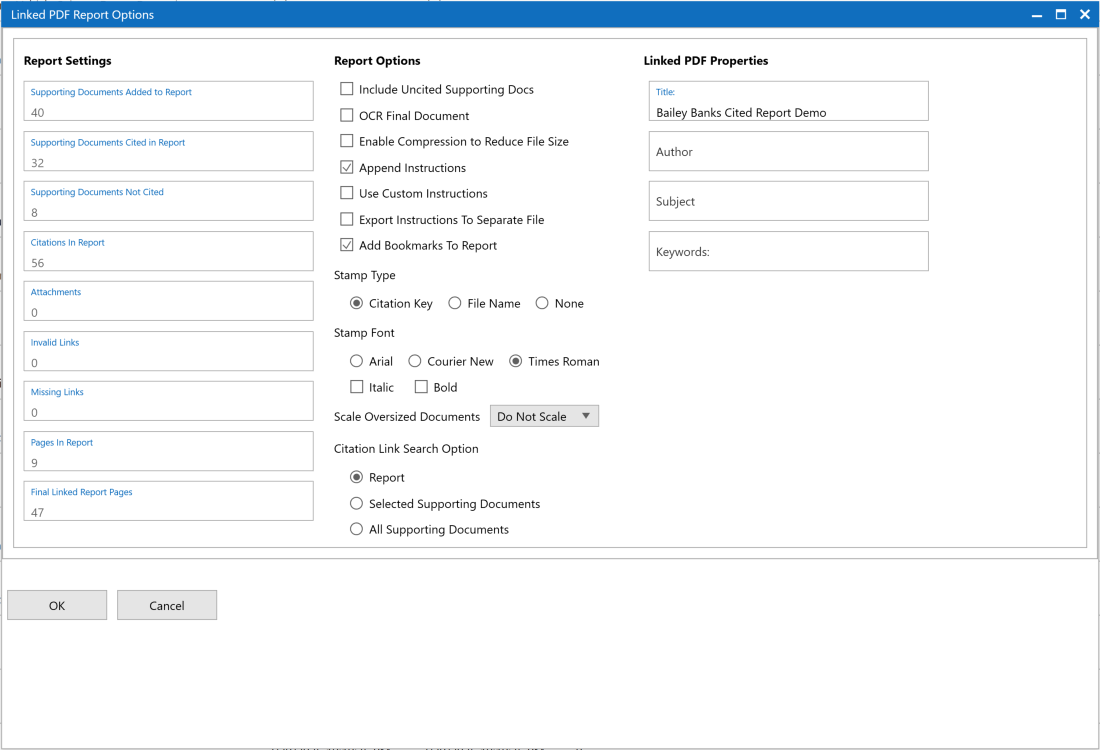
Generate a single, interactive PDF that combines your written work with clickable citations and embedded sources—ideal for peer review, class submission, or academic archives.

CITE allows every quote, paraphrase, or dataset to be easily tied to a verifiable source—eliminating accidental plagiarism and making every submission ready for grading, publishing, or defense.

Stop scrambling to track down references before grading, publication, or peer review. Every citation in CITE stays linked to its original source, ensuring your research papers, assignments, or teaching materials are fully traceable, academically sound, and ready for scrutiny at any level.

Reduce the grind of formatting and citation tracking so researchers and students can focus on insight, creativity, and original thought.

CITE enables faster student submissions, improved citation quality, and stronger academic performance across writing-intensive programs, research centers, and graduate cohorts.

Seamless Integration with Campus Tools

Quick Set-Up. Easy Learning Curve.

CITE works alongside your current academic platforms—Google Drive, Canvas, Blackboard, SharePoint, and library archives—without disruption.

  • Convert 100+ file types and upload journal articles, PDFs, lecture slides, datasets, and notes directly into your project.
  • Use CITE online or offline—ideal for fieldwork, field studies, or spotty campus Wi-Fi.
  • Built-in audit trails, citation history, and document versioning support academic integrity policies and grant documentation.
  • Export polished, interactive reports ready for class, submission portals, or publisher review.

Built for Researchers, Instructors & Students

Consistent Output. Better Learning. Smarter Collaboration.

Whether you’re leading a research lab, teaching undergraduates, advising thesis students, or writing your thesis, CITE improves how research is written, cited, and shared.

Use institution-wide templates for capstone papers, literature reviews, journal submissions, or assessment rubrics.

Maintain discipline-specific citation formats and shared reference folders for labs, courses, or teams.

Faculty, students, and research assistants can share source-linked reports that maintain integrity, clarity, and continuity.

As projects evolve or authors rotate, CITE makes it easy for new contributors to understand what was written, why it was cited, and where the evidence lives.

Flexible AI Integration

Bring Your Own AI – On Your Terms

CITE allows you to use trusted AI tools like ChatGPT or Gemini—directly in your research workspace.

  • Summarize long academic articles, public datasets, or field notes.
  • Draft grant proposal summaries or teaching materials.
  • Rewrite or clarify complex sections—while keeping original sources in view to maintain citation integrity.

Note: AI use is optional and fully transparent, supporting your institution’s academic honesty policies.

Frequently Asked Questions

CITE is Windows desktop software you install locally. Download the free trial, then run CiteSetup.msi. When you first launch CITE, you can set up your license in the app—choose a free trial or a paid plan. You do not have to activate a license before you open CITE.

Create or open a project (.cit file) and import supporting documents. Open those files in the Viewer, then create citations to them in the report editor. When you are ready, export a linked interactive PDF for reviewers.

Want a walkthrough first? Book a demo through the contact form. Enterprise customers can add dedicated onboarding and customized training.

Most users are up and running in under 30 minutes. CITE’s interface is intentionally designed to feel familiar to anyone who’s used Microsoft Word. Enterprise licenses include personalized onboarding sessions, group training, and a dedicated account manager to help configure workflows and templates.

Absolutely. CITE maintains local control of all files and provides an audit log, time-stamped citations, and unique identifiers for every source.

Yes! Create tailored templates and customize citation formats to align with your organization’s investigative protocols and compliance requirements.

Yes. CITE supports tracked changes, commenting, and interactive PDFs, making peer review and academic feedback seamless and intuitive.

Optionally. CITE does not require AI. If you connect a verified provider (ChatGPT or Gemini—using your account/API arrangement), you can use assisted actions such as summarize, rewrite, or extract key points on text you choose to send. That transmission goes to the provider you selected under that provider’s terms; it does not go to an in8development-hosted model. Do not connect AI, or send source material, unless that provider meets your security obligations. See Security for the shared-responsibility summary.