Skip to content

CITE: Faster Drafts. Fewer Errors. Stronger Legal Documents.

CITE revolutionizes legal writing with one-click citations, centralized sources, and client- or court-ready interactive PDFs—all in one app. cutting prep time and reducing rework across the caseload. How we handle data is on the Security page.

One App. All Sources. Legal Docs in Record Time.

Faster to write. Faster to review. That’s the ROI.

From legal briefs to due diligence reports, CITE accelerates every stage of legal document creation—bringing case law, contracts, statutes, and exhibits together in one streamlined workspace. The brief and its sources stay connected from the first draft through review. A short pilot on a few real reports will show the time save.

Eliminate hours spent hunting for references, formatting footnotes, and bundling exhibits. CITE’s integrated workflow keeps your focus on the legal argument, not the logistics.

CITE isn’t just a citation assistant, it’s a complete legal drafting platform with built-in templates, customizable snippets, paragraph structuring, and Word-style formatting designed for law firm workflows.

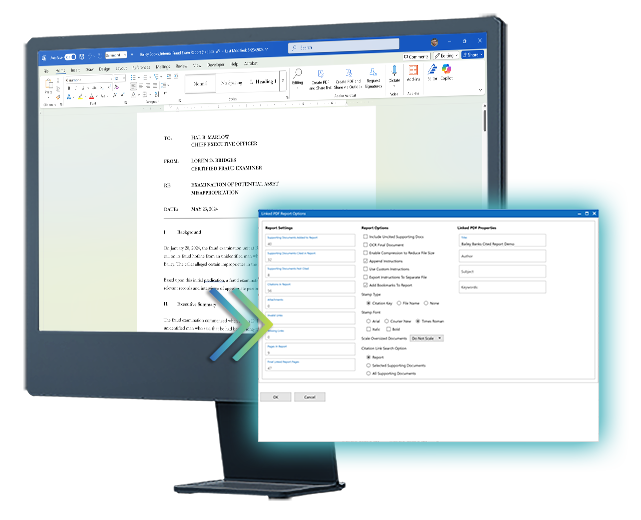
With a single click, generate a court- or client-ready file that includes your legal brief, embedded citations, and linked source materials—no separate exhibit binder needed.

Stop chasing down missing attachments or verifying outdated references before filing deadlines. CITE maintains a live link between every citation and its supporting documentation.

Spend less time on version control and formatting, and more time preparing arguments, advising clients, or advancing your case.

We offer a free pilot for firms that want to run CITE on their own matters. Three to five source-intensive documents will show what faster writing and faster review are worth.

Built to Integrate, Designed to Deploy

CITE Works With Your Tools—No Migration Needed

CITE fits seamlessly into your firm’s tech stack, enabling high-impact legal automation without disrupting established systems.

  • SharePoint, NetDocs, iManage?
    CITE works with the documents you already have in SharePoint, NetDocs, or iManage. Export or sync the files, then import them. No new case-management system required. 
  • CITE supports 100+ file types. Easily convert Contracts, Case Law, Discovery Docs, and Regulatory References directly from your file system.
  • Offline or Behind the Firewall?
    No problem; CITE supports full functionality without an internet connection.
  • Full Audit Trails
    Keep every document, revision, and citation traceable—ideal for internal reviews or legal audits.
  • Export Interactive PDFs
    Create easy-to-share PDFs, complete with embedded citations and exhibits for partners, opposing counsel, clients, or other stakeholders.

Built for Legal Teams

Aligned Teams. Consistent Workflows. Seamless Handoffs.

Whether you’re working in a litigation team, transactional group, or regulatory unit, CITE brings standardized legal writing to the entire firm.

Every CITE document follows a consistent, professional structure—making reviews faster and team transitions smoother.

Create and share templates for motions, memos, and client letters. 

When a file moves between teams, new counsel can immediately understand the logic, sources, and structure of the report—no rework needed.

CITE’s portable, interactive PDFs make collaboration across practice groups, offices, or co-counsel teams simple and efficient.

Use the AI tools you already trust, including ChatGPT or Gemini, to summarize depositions, refine arguments, or draft sections—all inside the same interface.

CITE empowers legal teams to work independently but in sync—using a shared framework that makes reports portable, inspectable, and immediately usable by anyone with CITE access.

Integrate Your Favorite AI Tools, Your Way

CITE doesn’t force you into a single AI system. Instead, it gives your team the freedom to plug in the trusted tools you already use—like ChatGPT or Gemini—right alongside your evidence and supporting documents. Enhance your analysis, streamline your drafting, and get more out of your casework, all within one unified workspace.

  • Bring Your Own AI – CITE supports integration with the tools you already trust, all without proprietary lock-in or vendor limits.
  • Summarize Long Documents – Use AI to distill lengthy supporting documents into digestible narratives.
  • Stay in the Flow – Use AI without jumping between tabs, apps, or file systems. Everything happens right where your sources live.

Frequently Asked Questions

CITE is Windows desktop software you install locally. Download the free trial, then run CiteSetup.msi. When you first launch CITE, you can set up your license in the app—choose a free trial or a paid plan. You do not have to activate a license before you open CITE.

Create or open a project (.cit file) and import supporting documents. Open those files in the Viewer, then create citations to them in the report editor. When you are ready, export a linked interactive PDF for reviewers.

Want a walkthrough first? Book a demo through the contact form. Enterprise customers can add dedicated onboarding and customized training.

Most users are up and running in under 30 minutes. CITE’s interface is intentionally designed to feel familiar to anyone who’s used Microsoft Word. Enterprise licenses include personalized onboarding sessions, group training, and a dedicated account manager to help configure workflows and templates.

Absolutely. CITE is a locally installed platform, with built-in access logs, citation time stamps, and evidence integrity tracking for defensibility.

Yes. Tailor templates for litigation, opinion letters, memos or transactional work. Customize citation styles to match your firm or jurisdictional standards.

Yes—CITE integrates with existing file systems and can ingest documents from most repository setups without requiring API-level integration.

Yes. CITE allows for any registered user to track changes and comments, and export interactive PDFs. Anyone with a PDF reader can view the interactive PDFs, making reviewing faster and clearer. 

Optionally. CITE does not require AI. If you connect a verified provider (ChatGPT or Gemini—using your account/API arrangement), you can use assisted actions such as summarize, rewrite, or extract key points on text you choose to send. That transmission goes to the provider you selected under that provider’s terms; it does not go to an in8development-hosted model. Do not connect AI, or send source material, unless that provider meets your security obligations. See Security for the shared-responsibility summary.