One app. Every source. Reports in record time.

Cite as you write

Unified Platform

Centralized Sources
Integrate Your Favorite AI Tools
CITE doesn’t lock you into a proprietary engine. Instead, you connect the AI tools you already trust (ChatGPT or Gemini) right alongside your source library. Summarize long transcripts, extract key quotes, or generate data-driven insights—all without leaving the same interface where your evidence lives.
Boost Credibility, Minimize Risk
When sources are scattered across dozens of apps and platforms, errors slip through the cracks. CITE’s centralized library plus hyperlinked citations eliminate guesswork. Auditors, legal teams, and decision-makers can verify every assertion instantly, reducing rework, minimizing liability, and building trust in your findings.
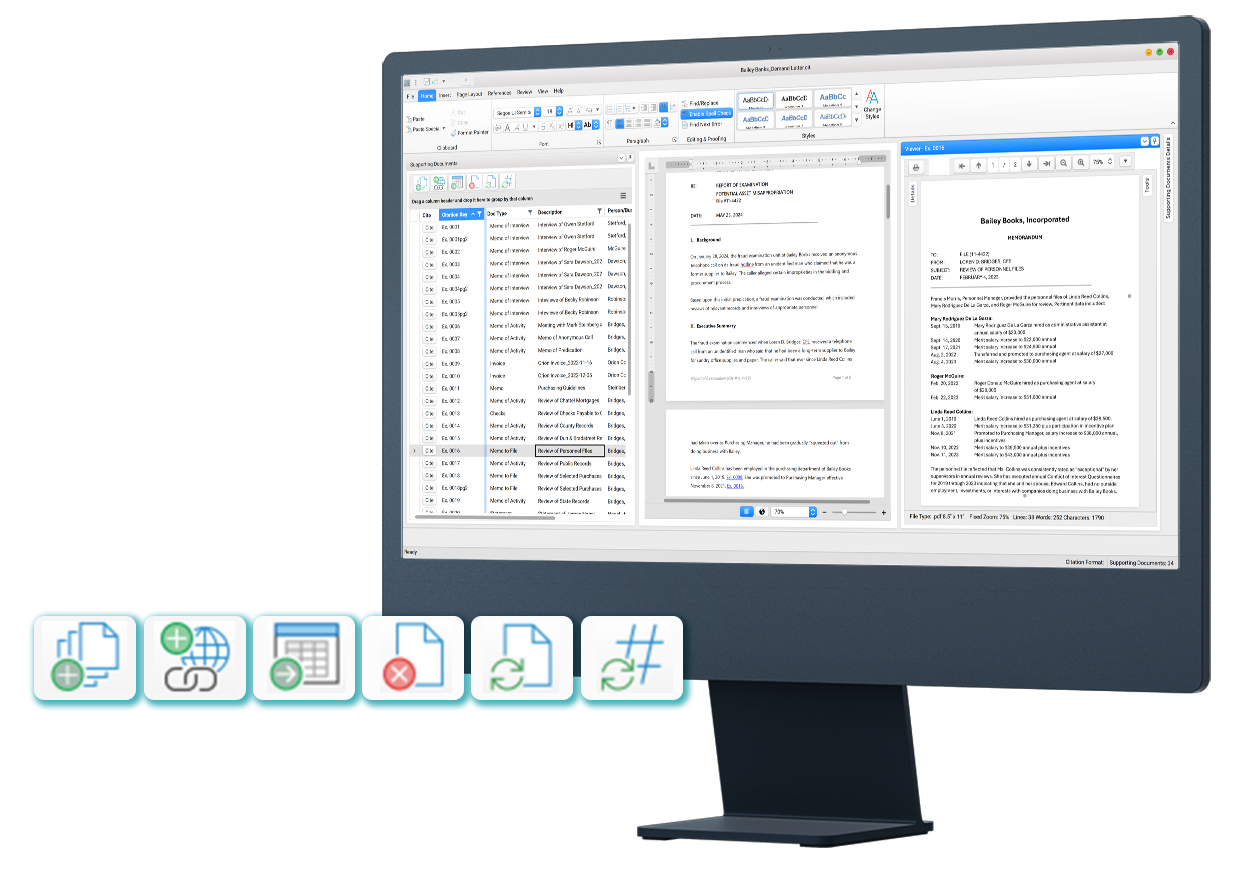
Organize
- Import and organize supporting documents and URLs related to the report.
- Save time on setup with bulk import tools that ingest entire folder structures from shared drives or cloud storage.
- CITE supports 100+ file formats, including PDFs, image files, Microsoft Office and CAD.
Report
- A robust word processing engine for report writing, editing, and formatting–offering a familiar, user-friendly experience.
- One-click creation of hyperlinked citations to supporting documents, including pinpointed references to specific pages.
- Connect the AI platforms you already use—ChatGPT or Gemini—directly within CITE. Generate summaries and rewrite text without switching apps, keeping your source context in view at all times.
Share
- Generate a single-file, interactive PDF that preserves all hyperlinked citations, cross-references, and bookmarks. Stakeholders can click any citation to jump directly to the embedded source document, making review and verification effortless.
- Hyper-compress large reports to deliver high-quality linked PDFs at the smallest possible file size.
- Toggle citations on or off to produce fully sourced or clean, reader-friendly versions.
Simple, Transparent Pricing
Standard | $200/mo or $2,000/yr
- Free 4-month trial for all new users
- Video onboarding
- Email support
- Monthly webinar tutorials
- Access to our FAQ Knowledge Base
- Available at no cost to students and at a discounted rate to academics. Contact us for details.
Enterprise | Contact us
- Everything offered under the standard license, plus:
- Personalized onboarding & training
- Dedicated account manager
- Phone/Live-video
- Contact us for custom enterprise pricing.
Frequently Asked Questions
CITE is Windows desktop software you install locally. Download the free trial, then run CiteSetup.msi. When you first launch CITE, you can set up your license in the app—choose a free trial or a paid plan. You do not have to activate a license before you open CITE.
Create or open a project (.cit file) and import supporting documents. Open those files in the Viewer, then create citations to them in the report editor. When you are ready, export a linked interactive PDF for reviewers.
Want a walkthrough first? Book a demo through the contact form. Enterprise customers can add dedicated onboarding and customized training.
Yes. Most users are productive in about 30 minutes—the editor is intentionally familiar if you have used Microsoft Word. Standard support includes short video tutorials, a written user guide, email support, and (where offered) webinars or a chatbot for in-product questions. Enterprise plans can include personalized onboarding, group training, and a dedicated account manager to help with templates and workflows. Academic and student options are described on the CITE and Pricing pages.
CITE keeps source material, analysis, citations, and report writing in one workspace so reviewers are not chasing folders of exhibits. You cite as you write; PDF sources can be merged into a single linked PDF with page-level links; other files can travel as attachments inside the package. The goal is a defensible record a prosecutor, auditor, or supervisor can check—not just a faster Word document. Teams also get time back on collation, citation, and packaging.
Yes. You can use report templates and reusable snippets, configure citation link styles, and shape the report structure to match your standards. Workflows stay file-based (share .cit projects and interactive PDFs) rather than forcing a new case-management system. CITE works with documents from shared drives, SharePoint, and common evidence or RMS exports by importing files—no API-level integration required for typical use. Enterprise setups can go further on templates, training, and onboarding.
Optionally. CITE does not require AI. If you connect a verified provider (ChatGPT or Gemini—using your account/API arrangement), you can use assisted actions such as summarize, rewrite, or extract key points on text you choose to send. That transmission goes to the provider you selected under that provider’s terms; it does not go to an in8development-hosted model. Do not connect AI, or send source material, unless that provider meets your security obligations. See Security for the shared-responsibility summary.